
You've gathered medication lists, discharge papers, insurance letters, and specialist notes. A private care manager says they can help coordinate everything, but they need copies of your loved one's records and permission to discuss care with the doctor's office. That's usually the moment many family caregivers pause.
That pause makes sense. You're not being difficult. You're trying to protect someone who may already feel exposed, tired, or dependent on others. Health information is personal, and once it starts moving between helpers, apps, agencies, and advisors, it can become hard to track who has what.
A Business Associate Agreement template can help turn that uneasy handoff into a clear, written set of boundaries. Think of it as a practical protection step, not legal theater. It helps spell out what the other person can do with private health information, how they must protect it, and what happens if something goes wrong.
Protecting Your Loved One's Information
A daughter hires an independent geriatric care manager to help with her father's appointments. She has a thick binder on the kitchen table: medication history, test results, discharge summaries, and notes about memory changes. She wants help. She also wants control.
That tension is common in caregiving. You need other people involved, but every new helper may need access to sensitive details. A care manager might need updates from cardiology. A bookkeeper may need medical bills. A home care agency may need medication instructions. Each handoff creates another privacy decision.
If you're also sorting through state privacy rules, it helps to understand that health privacy can go beyond HIPAA. For example, this overview of Washington State health data privacy is useful if you live in Washington or use digital health tools that collect sensitive information outside a doctor's office.
A BAA can feel abstract until you connect it to a real caregiving task. It's the written version of saying, “I'm trusting you with this information for this purpose only, and you must protect it.” That matters when your loved one is older, overwhelmed, or relying on you to notice risks they may not see.
Practical rule: If someone needs health information to perform an ongoing service for your family, don't rely on a handshake alone.
Caregivers often confuse privacy paperwork. A HIPAA release lets someone share information in certain ways. Informed consent deals with understanding and agreeing to care or treatment. If that distinction feels blurry, this plain-language guide to elements of informed consent can help you sort out which document does what.
What matters most is simple. Before you email records, upload files, or invite a vendor into a care coordination system, stop and ask: what rules are protecting my loved one's information once it leaves my hands?
What Is a Business Associate Agreement in Plain English
A Business Associate Agreement, usually shortened to BAA, is a written contract about health information. It exists because HIPAA requires a covered entity to contract with any business associate that will create, receive, maintain, or transmit protected health information, or PHI. The agreement must define permitted PHI uses and disclosures, require safeguards, and address the return or destruction of PHI when the relationship ends, according to HIPAA Journal's explanation of business associate agreements.
That sounds formal, but the everyday version is easier to understand.
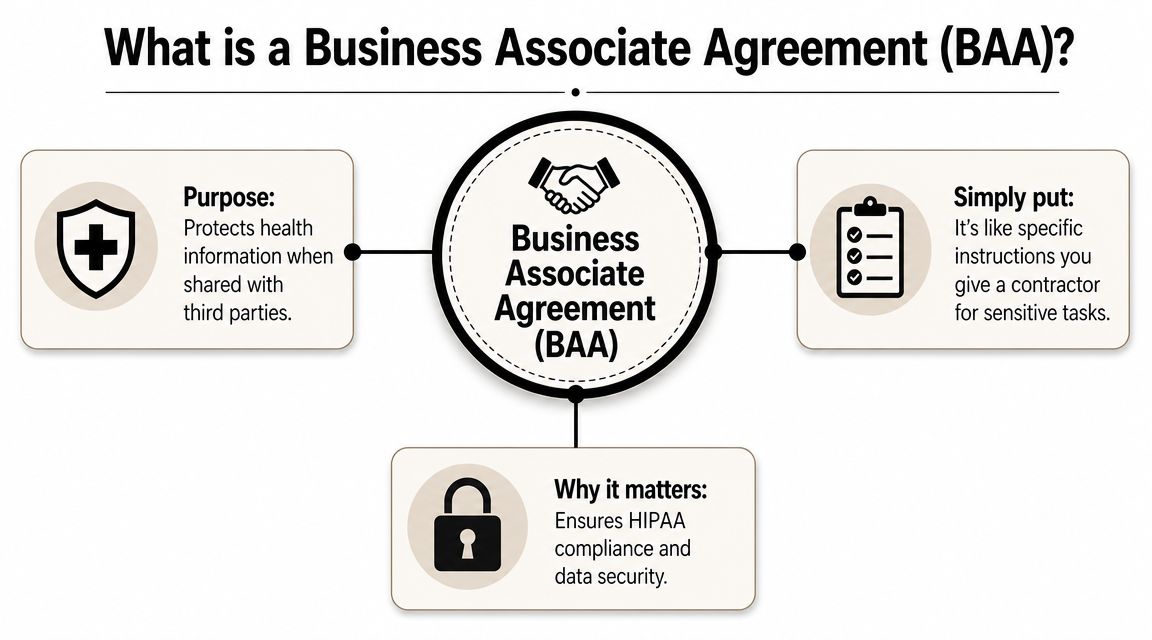
A house key analogy
Think about giving someone a key to your house while you're away.
You don't just say, “Use it however you want.” You tell them which rooms they can enter, what they're there to do, how to lock up, and who to call if there's a leak or broken window. A BAA works the same way for private health information.
The “key” is access to PHI. The instructions are the contract terms.
Who's who in the agreement
The labels can confuse people, so here they are in plain language:
- Covered entity means the healthcare provider, plan, or organization that holds the health information and is directly regulated under HIPAA.
- Business associate means the outside person or company performing services that involve that information.
- Subcontractor means another outside helper hired by the business associate who also touches the information.
If your loved one's clinic uses an outside billing company, that billing company may be a business associate. If that billing company hires a cloud vendor that stores the records involved in billing, that downstream relationship also matters.
A BAA isn't a generic privacy promise. It's the document that puts the privacy duties in writing for the outside party handling the information.
Why caregivers should care
Family caregivers often run into BAAs when using technology or outside support. A care platform may store medication lists. A remote coordination service may keep appointment notes. If you're trying to understand the technical side of how health systems connect, this overview of API strategies for EMR gives useful context for how information can move between tools.
Here's the practical takeaway. A Business Associate Agreement template isn't there to make things complicated. It helps make sure the person or company handling your loved one's information knows exactly what they can do, what they can't do, and what security obligations follow them while they do the work.
When a Family Caregiver Needs a BAA (Eldercare Examples)
Family caregivers usually don't ask, “Is this a business associate?” They ask, “Can I safely share this information with this person?” That's the right instinct.
The answer depends on the job the person is doing and whether that job involves handling protected health information in an ongoing, service-based way.

A private care manager
You hire a solo geriatric care manager because your mother has multiple specialists and forgets what each one says. The care manager attends appointments, keeps notes, emails follow-up questions, and stores medication updates on a laptop.
That person may handle diagnoses, doctor instructions, treatment history, and contact details. In plain terms, they're not casually overhearing private information. They're using it to provide a service. That's the kind of relationship where a written agreement matters.
A caregiver in this situation should ask questions like:
- Where records are stored. Are they kept in email, on a laptop, in a portal, or in paper files?
- Who else can see them. Does the care manager use an assistant, transcription service, or outside software?
- What happens at the end. Will records be returned, deleted, or archived?
A home care agency with care logs
A non-medical home care agency sends aides to help with meals, supervision, and medication reminders. The aides document blood pressure readings, behaviors, sleep issues, or missed medications in a shared system.
That setup can look “non-medical” on the surface, but the records can still contain sensitive health details. If the agency is collecting and maintaining those details as part of its service, your family should treat that information flow seriously.
A Business Associate Agreement template can help you pin down the boundaries. It can describe what information the agency may collect, who can access the logs, and when the agency must report a security problem.
A financial or legal helper handling health-related files
An elder law attorney or financial planner may need medical bills, long-term care invoices, or records showing care needs to help with planning or benefits work. Families sometimes assume these professionals are covered by general confidentiality rules, so they stop there.
General confidentiality may help, but it doesn't answer every health-data question. If the service depends on regular access to protected health information, you want the handling rules in writing.
When a helper needs repeated access to medical records to do their job, “they're trustworthy” isn't enough. Trust is better when it's documented.
A care coordination app
Many families create a digital system for siblings, paid helpers, and outside professionals. The app may include diagnosis summaries, medication schedules, appointment updates, and scans of insurance cards.
That convenience can be excellent for care. It can also scatter private information if the platform wasn't chosen carefully. Before you use any shared care tool, organize what information is going into it. This guide on how to organize medical records can help you separate must-share items from everything else.
A quick decision guide can help:
| Situation | Why a BAA question comes up |
|---|---|
| Independent care manager | They may store and use health information to coordinate services |
| Home care agency with health logs | Staff may collect and maintain sensitive care details |
| Financial or legal helper using medical files | They may need ongoing access to health-related records |
| Care coordination platform | The tool may store and transmit private information among helpers |
Your Free Business Associate Agreement Template
If you're looking for a Business Associate Agreement template you can read without feeling buried in legal jargon, use this as a starting point for caregiving-related situations. It's meant for the practical moments families face when they bring in outside help and need clear privacy rules around medical information.
This kind of template works best when you treat it as a draft you complete thoughtfully, not a form you sign on autopilot. It can give you structure, but it can't replace legal advice for unusual arrangements, disputes, or high-risk vendor relationships.
What the template should include
A caregiver-friendly BAA template should make it easy to identify the basics:
- Who the parties are. Name the provider, service company, or independent contractor receiving the information.
- What services are being performed. “Care management,” “care coordination software,” or “billing support” is more useful than vague labels.
- What information is involved. Medication lists, appointment notes, diagnoses, treatment plans, insurance information, or invoices.
- What happens if the relationship ends. The template should prompt a discussion about return or destruction of records.
Download and use it carefully
Use a file format you can edit, save, and share for signature. Word documents are often easiest because you can add service details, narrow the scope of information, and mark parts that need legal review.
A simple download callout might look like this in your own workflow:
- Editable version for customizing names, services, and privacy terms
- PDF version for final review and signature
- Saved copy in the same place you keep contracts, releases, and care coordination documents
Before you click send
Read the first page slowly. Most of the practical value sits right at the top.
Check these fields before sharing the draft:
- Effective date
- Full legal names of both parties
- Description of the services
- Contact information for privacy or incident reporting
- Signature lines for both sides
If the other side says, “Just send over the records and we'll do paperwork later,” pause. The safest time to settle expectations is before information starts moving.
Understanding the Key Clauses in Your BAA Template
Many caregivers sign forms they don't fully understand because they're exhausted and trying to keep things moving. That's normal. It's also fixable.
A solid Business Associate Agreement template becomes much less intimidating once you know what each clause is trying to do for your family.
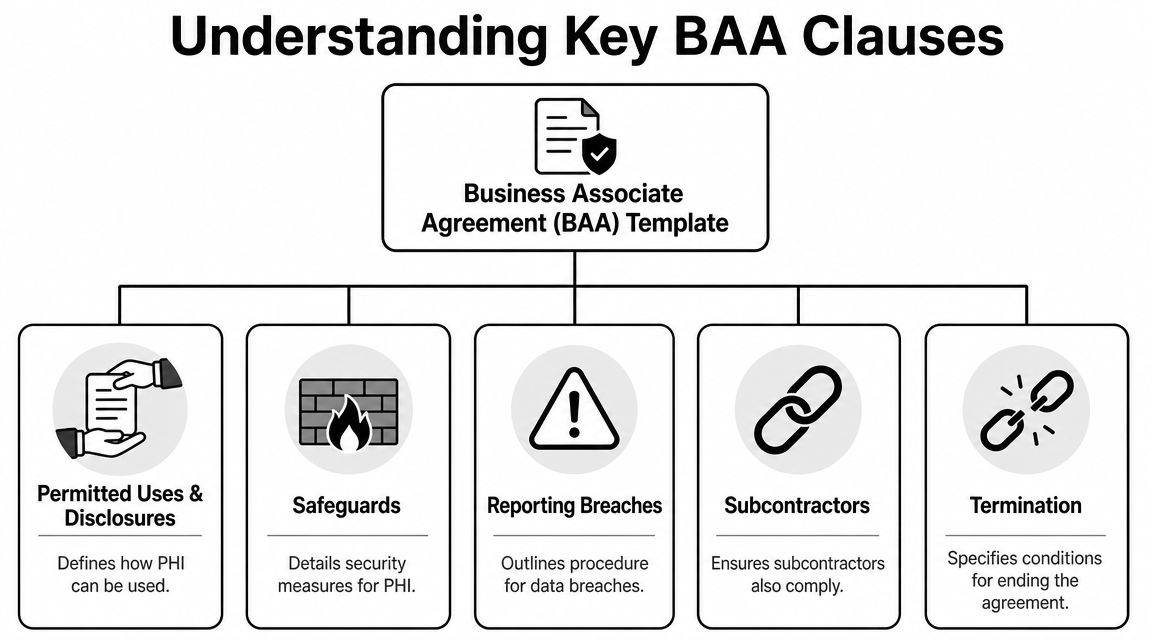
Permitted uses and disclosures
This clause says what the outside person or company is allowed to do with the information.
If you hire a care manager to coordinate appointments, the agreement should limit use of the information to that purpose. It shouldn't read like a blank check. The narrower this section is, the easier it is to tell when a boundary has been crossed.
Example in plain English: “You may use my father's records to coordinate care and communicate with listed providers, but not for unrelated business purposes.”
Safeguards
This is the “how will you protect it?” section.
It covers the steps the business associate must take to keep information secure. In practical terms, caregivers should look for language that addresses storage, access, and handling practices. Even if the legal wording is formal, you want to understand the daily reality behind it.
Ask simple questions:
- Is information stored on personal devices?
- Are files sent through ordinary email?
- Are paper records locked up?
- Who inside the company can open the file?
Reporting breaches or security incidents
This clause matters more than people realize. If something goes wrong, your family needs to know quickly.
One template requires reporting to the covered entity within 14 days, and some templates also require annual penetration tests by an independent assessor and annual SOC 2 Type 2 assessments for covered services, according to the Delaware BAA template example. Those details show what a more effective control model can look like in practice.
If a vendor can't clearly explain how they would tell you about a security incident, the contract deserves a closer look.
Subcontractors
This clause answers a question caregivers often forget to ask. Who else is involved?
The person you hire may use an assistant, cloud storage vendor, scheduling platform, or outside IT support. If those subcontractors handle the information, the agreement should require the same protections to flow down to them.
A good way to phrase your concern is simple: “Please list any outside tools or service providers that may handle these records.”
Support for access and corrections
Sometimes your loved one needs access to their information, wants a correction, or needs a record of certain disclosures. A BAA often includes duties that help support those rights.
You don't need to memorize the legal language. You just want to know the vendor isn't creating a roadblock if a record needs to be found, updated, or accounted for later.
Termination and record handling
This clause covers the end of the relationship.
When the work is over, what happens to the data? The agreement should say whether it will be returned, destroyed, or, if destruction isn't feasible, protected under continuing safeguards. For caregivers, this is one of the most important practical clauses because relationships change often. Agencies are replaced. Consultants retire. Apps get abandoned.
Here's a simple review table:
| Clause | What it means for a caregiver |
|---|---|
| Permitted uses | Limits why your loved one's information can be used |
| Safeguards | Describes how the information will be protected |
| Incident reporting | Tells you how quickly problems must be reported |
| Subcontractors | Extends privacy duties to downstream helpers |
| Access and corrections | Helps avoid dead ends if records need review |
| Termination | Explains what happens to records when services end |
How to Customize and Sign the Agreement
A template only protects your family if it matches the actual service relationship. One major pitfall is treating a BAA as untouchable boilerplate. Guidance recommends mapping the specific PHI data flows, storage locations, and subcontractors involved before finalizing the agreement, as explained in this review of BAA template examples and legal pitfalls.
That sounds technical, but a caregiver version is manageable.
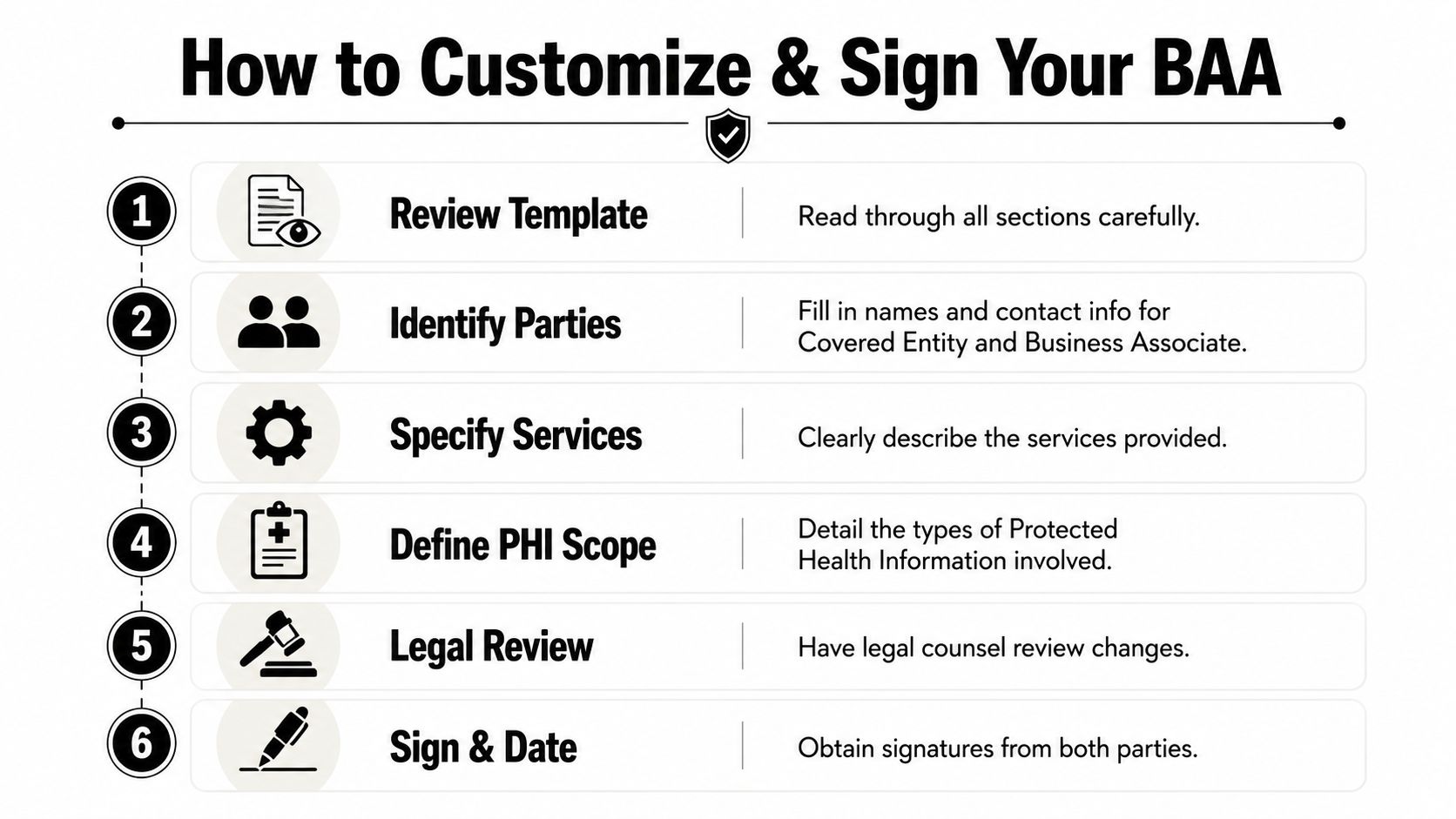
Start with the care relationship, not the form
Before filling in blanks, write down what's happening.
- What service is being provided. Care management, home care documentation, billing support, benefit application help, or software hosting.
- What information is involved. Diagnoses, medication lists, appointment notes, billing records, or insurance information.
- Where the information will live. Email inboxes, a care app, cloud storage, paper files, or agency software.
- Who else may touch it. Assistants, subcontractors, software vendors, or support teams.
This short exercise often reveals risks the template alone won't catch.
Fill in the parts that matter most
When you customize the document, slow down at the sections people usually skim:
Names of the parties
Use full legal names, not nicknames or shorthand.Description of services
Be specific. “Care coordination services for appointment scheduling, provider communication, and medication tracking” is better than “consulting.”Scope of PHI
Limit access to what's needed for the service.Security and reporting contact
Include a real person, email address, or business contact for urgent issues.
A template should reflect the real path your loved one's information takes, not the imaginary path a generic form assumes.
Signing and storing it
The right signer is the person with authority to bind each side to the agreement. For a company, that may be an owner, executive, or authorized representative. For the family side, use the person who has the legal ability to act in the arrangement being documented.
Digital signatures are often practical if both parties agree and the final signed copy is complete and readable. After signature:
- Save one copy in your care records
- Send one fully signed copy to the other party
- Store it where you keep HIPAA releases, powers of attorney, and service contracts
If the service changes later, revisit the agreement. New software, new staff, or new categories of health information can turn an old template into an incomplete one.
Common BAA Mistakes Caregivers Should Avoid
Caregivers don't usually get into trouble because they're careless. They get into trouble because they're busy, they trust the helper, and the paperwork feels secondary to the crisis in front of them.
Still, some mistakes create avoidable risk.
Mistaking “small provider” for “small risk”
A solo contractor can handle highly sensitive information. The size of the business doesn't tell you how much damage a privacy failure can cause. If someone is managing private records as part of a service, the risk is real even if they work alone from a laptop at home.
Using the first template you find online
A corporate template may be too broad, too vague, or written for a different kind of relationship. Families need terms that fit actual caregiving arrangements, not just enterprise vendor contracts.
Sharing records before the agreement is signed
This is one of the easiest mistakes to make. The other side says they need the information urgently. You send it and plan to “clean up the paperwork later.”
That order matters. The failure to execute a BAA can expose organizations to HIPAA penalties ranging from $127 to over $1,919,173 per violation, depending on culpability, according to Holland & Hart's discussion of business associate agreement requirements.
Forgetting the downstream chain
You may trust the person you hired and still miss the tools behind them. If they use outside storage, contractors, or support services, your loved one's information may travel farther than you realized.
Losing the signed copy
A signed agreement won't help much if nobody can find it. Keep it with your other legal and care planning documents. If your family is building a broader support system, this guide to senior citizen legal assistance can help you think through where privacy agreements fit alongside other legal paperwork.
The safest agreement is the one you can locate quickly, understand easily, and enforce when something changes.
The goal isn't to turn family caregiving into contract management. It's to create a clear boundary around health information so the people helping your loved one know their responsibilities from the start.
If you're juggling appointments, paperwork, and family decisions, Family Caregiving Kit offers practical guides and tools that help turn confusing care tasks into manageable next steps.